Routing Beats Memorizing
New AI tools appear every week. If you try to keep up with all of them, you will feel behind forever.
Operators use a different habit:
- Name the work.
- Choose the tool type.
- Write the first prompt.
- Check the output.
- Save what worked.
The goal is not to know every app. The goal is to know where a task belongs.
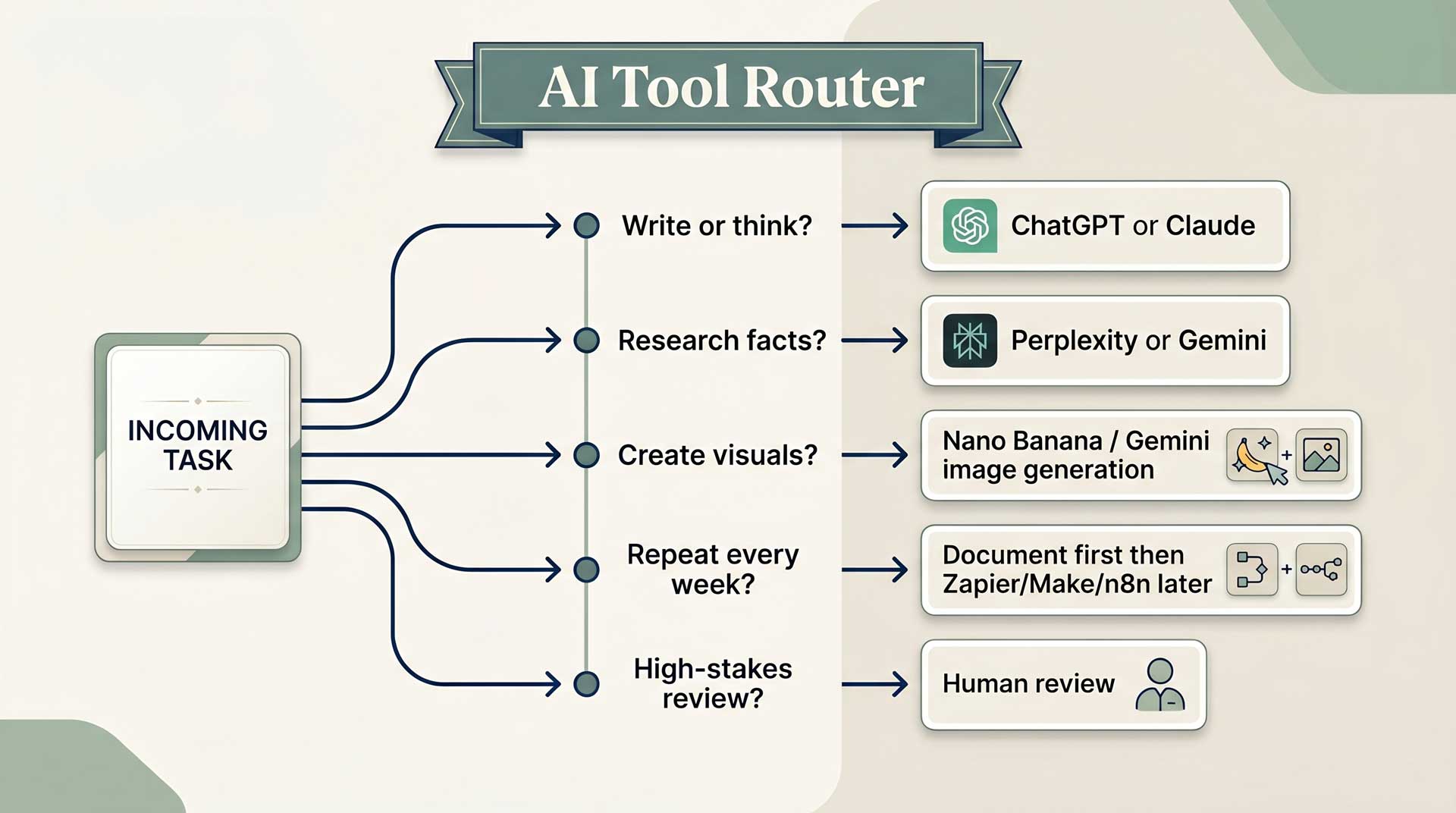
The 5-Question Tool Picker
Before opening a tool, ask these five questions.
1. Is this mostly writing, thinking, or organizing?
Use ChatGPT or Claude.
Examples:
- Write a clearer client email
- Turn messy notes into a checklist
- Plan a week of tasks
- Rewrite a paragraph so it sounds more human
2. Does this need current facts, prices, dates, or sources?
Use Perplexity or Gemini.
Examples:
- Compare competitor pricing
- Research local event options
- Find recent statistics for a proposal
- Check whether a claim is still true
3. Does this involve an image or visual idea?
Use Nano Banana / Gemini image generation.
Examples:
- Create a simple product mockup
- Generate a blog header idea
- Make a visual concept for a social post
- Turn a rough creative brief into image options
For beginner visual work, keep the brief simple: subject, setting, style, mood, and what to avoid.
4. Do I repeat this task every week?
Do not jump straight into automation. First, document the workflow.
Write down:
- What starts the task
- What information you collect
- What steps you take
- What output you need
- Where the output goes
Once the steps are clear, then you can consider Zapier, Make, or n8n. Automation works best after the workflow is already understandable.
5. Would a mistake be costly, embarrassing, or hard to undo?
Use AI for a draft, not the final answer.
Examples:
- Legal language
- Medical or financial decisions
- Public claims about a person or company
- Anything involving money, contracts, or safety
In those cases, AI can help you prepare, summarize, or organize. A human still checks the final decision.
Quick Check: Name the Lane
Multiple Choice
You need to compare pricing from three competitors and include source links. What kind of task is this?
Try It Now: Everyday Assistant
Open ChatGPT or Claude right now. Copy and paste this prompt:
You are helping me organize my week. I have too many loose tasks and I want a clearer plan.

Here are my tasks:
- Answer client emails
- Follow up on two unpaid invoices
- Draft one social media post
- Research one competitor
- Clean up my notes from a meeting
- Schedule time for one personal errand

Turn this into a simple weekly plan. Group similar work together, suggest what to do first, and give me a short checklist I can actually follow.
Notice the kind of output you get. This is a writing, thinking, and organizing task, so an everyday assistant is the right starting point.
Try It Now: Research Tool
Now open Perplexity or Gemini. Copy and paste this prompt:
Research three current AI note-taking tools for small business owners or freelancers.

For each tool, include:
- What it does
- Current starting price
- Source link
- Date checked
- One reason a beginner might like it
- One thing to be careful about

Return the answer as a simple table.
This is a research task because it asks for current prices, source links, and a date checked. Do not use a regular chat answer for this kind of work unless you are ready to verify every claim yourself.
Try It Now: Visual Tool
Now open Gemini. Click the plus button, choose the image creation option if your interface shows one, and paste this prompt:
Create a warm, simple image concept for a blog post about using AI to organize a busy workweek.

Subject: a desk with a notebook, laptop, coffee, and a tidy weekly plan on screen
Style: warm minimalist, premium education brand
Mood: calm, helpful, not futuristic
Colors: soft navy, sage green, cream
Avoid: robots, neon, holograms, cluttered floating screens
This is a visual task. The prompt gives subject, style, mood, colors, and what to avoid. That is enough to get a useful first image without overcomplicating it.
Practice: Tool Router Sprint
Review Game
Tool Router Sprint
Route each real-world task into the right lane. This is the instinct you are building before you worry about app names.
Draft a warmer reply to an unhappy customer
Find current prices from three competitors
Create a simple product mockup from a rough idea
Send new form responses into a spreadsheet every Friday
Review a contract clause before signing
Example: Route the Same Task Three Ways
Task: "I need to understand a competitor before sending a proposal."
If you need a fast thinking partner, use ChatGPT or Claude:
You are helping me prepare for a sales proposal. Here is what I know about the competitor: [notes].

Help me identify what the client may compare, where we are stronger, and what questions I should be ready to answer.
If you need current pricing, use Perplexity or Gemini:
Research [competitor name]'s current pricing and packages. Include source links and dates.

Summarize what each tier includes, what appears to be missing, and what a buyer might find confusing.
If you need a visual for your proposal, use Nano Banana / Gemini image generation:
Create a clean comparison graphic concept for a proposal slide. Show our offer and [competitor name] as two simple columns.

Style: premium, clear, non-aggressive.
Avoid: clutter, tiny text, exaggerated claims.
Same business need. Different work type. Different route.
A Simple Rule for This Course
If the task is mostly words, use your everyday assistant.
If the task needs fresh facts, use a research tool.
If the task needs an image, use Nano Banana / Gemini image generation.
If the task repeats, write down the workflow first.
If the task is high-stakes, use AI to prepare and then get human review.
That is the routing habit. Everything else in this course builds on it.
Final Game: Match the Prompt to the App
Drag each prompt tile into the app slot where you would start. You need a perfect match to complete the lesson.
Drag & Drop Game
Match the Prompt to the App
Drag each real-world prompt into the app slot where you would start the task.
On mobile: tap a prompt tile, then tap the matching slot.
Prompt tiles
App slots
ChatGPT / Claude
Drop a prompt tile here, or tap a tile and then tap this slot.
Gemini / Nano Banana
Drop a prompt tile here, or tap a tile and then tap this slot.
Perplexity
Drop a prompt tile here, or tap a tile and then tap this slot.
Zapier
Drop a prompt tile here, or tap a tile and then tap this slot.
Runway / Kling
Drop a prompt tile here, or tap a tile and then tap this slot.